FIND CORPORATE BUSINESS EMAILS & CONTACT NUMBER
Introducing the Leads Hunter

Find CEOs, High Level Managers, Presidents, Directors & more

The Leads Hunter helps you collect profile data from social media platforms including CEOs, Managers, Doctors, Decision makers and many top Management employees using keywords and locations.
10k+ Active Users
5M+ Leads Scraped

✕

Video will open on YouTube

▶ Play Video
Digital Marketing Agencies in Riyadh
Scanning Google Maps...
Companies found: 0
Company Location Phone Email Website

Our Social Media Extractor comes packed with powerful features designed for modern businesses.

Facebook
Instagram
LinkedIn
YouTube
Twitter
+3
More

Introducing the Leads Hunter Hunter

The Leads Hunter helps you collect profile data from social media platforms using keywords and locations. It is built for people who need social media leads in a clear and structured format.

Social Media Profile Collection

Collect profile names and usernames shown on social media pages.

Keyword and Location Search

Get publicly visible phone numbers and email addresses when available.

Platform Selection

Collect follower count, likes, or other profile statistics.

Find Business Owners

our Social Media Database provides millions of contacts from small business owners or influencers hungry to grow their business

Build Limitless Lead

Start with Leads hunter in less than 1 minute and unlock unlimited leads instantly today.

Best B2B Contact Data

You have unlimited monthly credits, regardless of email exports or phone number exports.

EASY 4-STEP SETUP • UNDER 2 MINUTES

How to Install Leads Hunter on Chrome

Follow our visual step-by-step walkthrough to extract, enable developer mode, load, and pin Leads Hunter to your browser toolbar.

1 STEP 1 • DOWNLOAD & EXTRACT

Download & Unzip Leads Hunter

Download the latest extension archive and extract the folder to your computer.

1
Click Download Extension Now to get the Latest Leads Hunter V.15.zip file.
2
Go to your Downloads folder, right-click the zip file and click "Extract All..." (or Unzip).
3
After extraction, you will see a normal folder named Leads Hunter.
Download ZIP (V15.0)
Downloads > Leads Hunter
📁
Leads Hunter
File folder • Ready to load
Extracted Folder
Load this folder! 📂
🗜️
Latest Leads Hunter V.15.zip
Compressed (zipped) Folder
2 STEP 2 • CHROME SETTING

Open Chrome Extensions & Enable Developer Mode

Developer Mode is a standard Chrome feature that lets you run extensions locally.

1
Open Google Chrome and click to copy chrome://extensions then paste it into your address bar & press Enter.
2
Or click Chrome Menu ⋮ > Extensions > Manage Extensions.
3
In the top-right corner, switch the Developer mode toggle to ON.
chrome://extensions
☰
Extensions
Developer mode
Turn ON! ⚡
3 STEP 3 • ONE-CLICK UPLOAD

Click "Load unpacked" & Select Leads Hunter

Load your unzipped Leads Hunter folder to finish the extension installation.

1
Once Developer mode is ON, click the Load unpacked button on the top-left toolbar.
2
A file dialog will open. Select the unzipped Leads Hunter folder and click Select Folder.
3
The Leads Hunter extension is now loaded and activated in your browser!
Load unpacked
Click Here! 👆
Pack extension
Update

Leads Hunter

15.0 Active

Collect profile data from social media platforms with precision.

4 ⚠️ IMPORTANT FINAL STEP

Pin Leads Hunter to your toolbar

Pinning keeps the extension one click away every time you need to extract leads.

1
Click the puzzle icon 🧩 at the top right of your browser toolbar.
2
Find "Leads Hunter" and click the pin icon 📌 to keep it visible on your toolbar.
3
Click the Leads Hunter icon anytime to launch the dashboard and start hunting leads!
Start Free Trial Now
APP WALKTHROUGH • 5 SIMPLE STEPS

How to Use Leads Hunter

From login to 1-click lead export — see how easy it is to find high-value B2B decision makers with verified contacts.

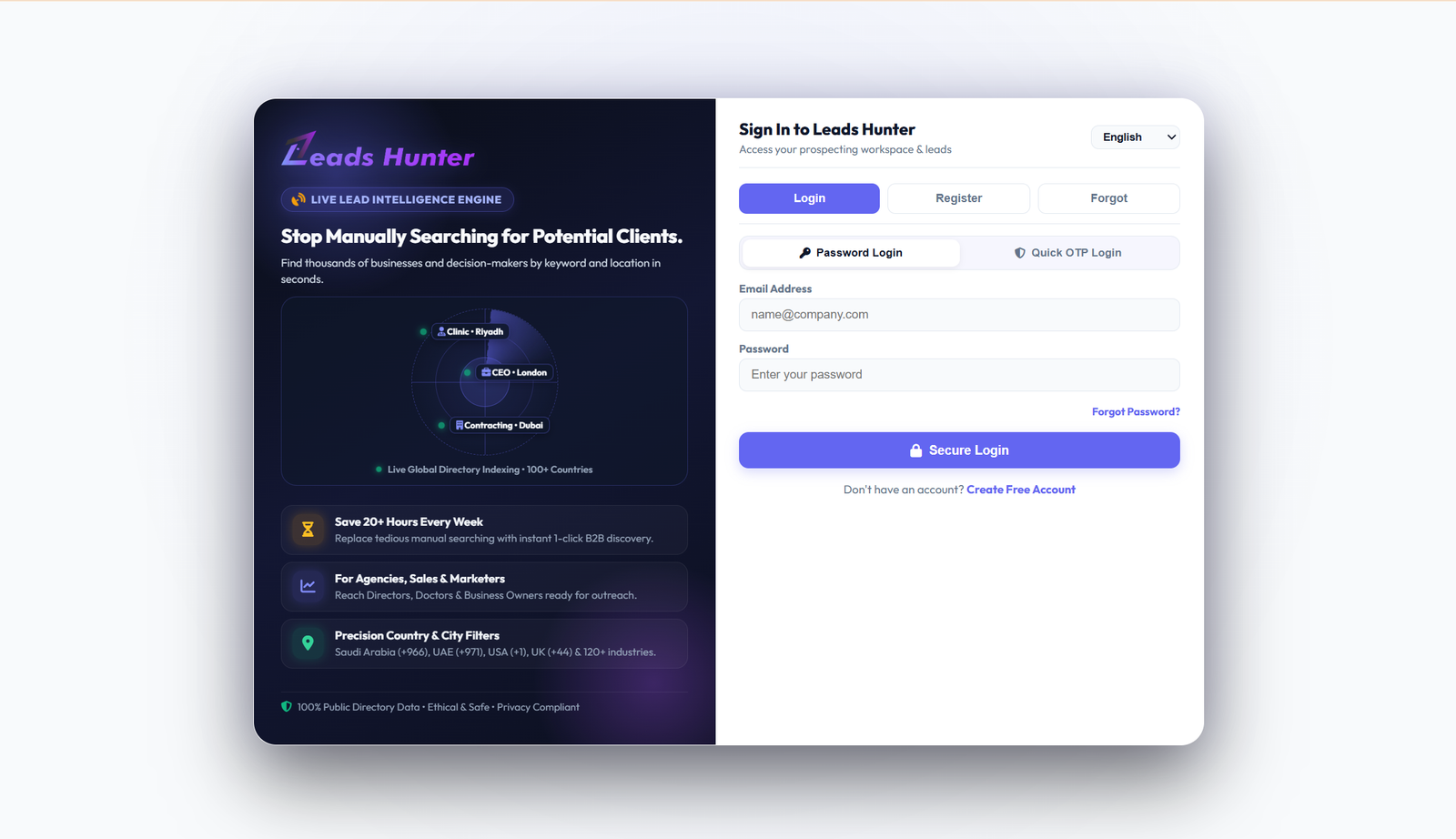
STEP 1 • SIGN IN

Secure Sign In to Leads Hunter

Access your prospecting workspace. Login with your registered email and password, or use Quick OTP Login with multi-language support (English / Arabic).

Leads Hunter • Secure Sign In
Leads Hunter Login Page
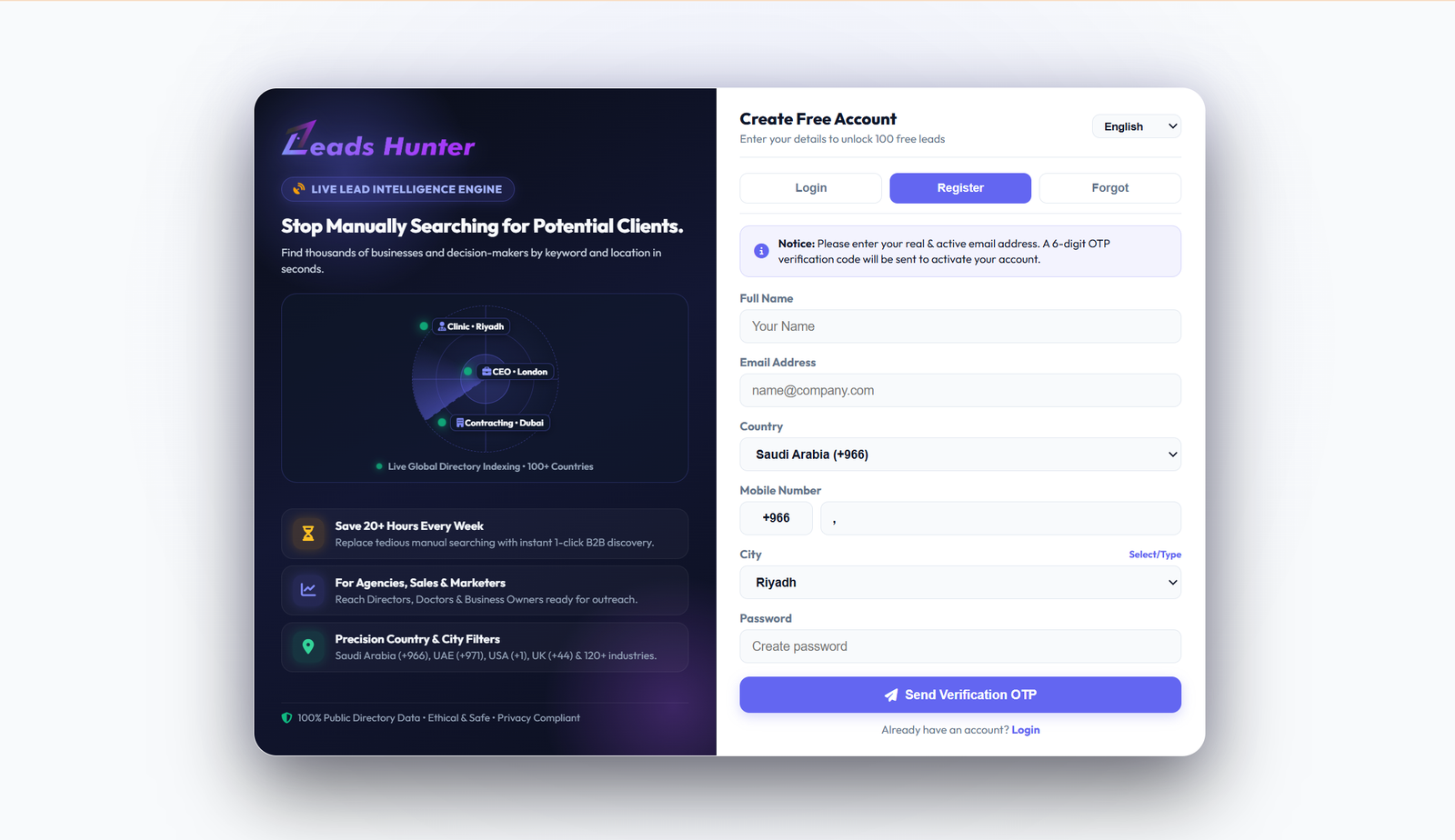
STEP 2 • CREATE ACCOUNT & FREE TRIAL

Register Account & Activate Free Trial

Create your free account by entering your Name, Email, Country, Mobile Number, and City. Receive a 6-digit OTP verification code to activate your 1-Day Free Trial instantly.

Leads Hunter • Create Free Account & OTP
Leads Hunter Register Page
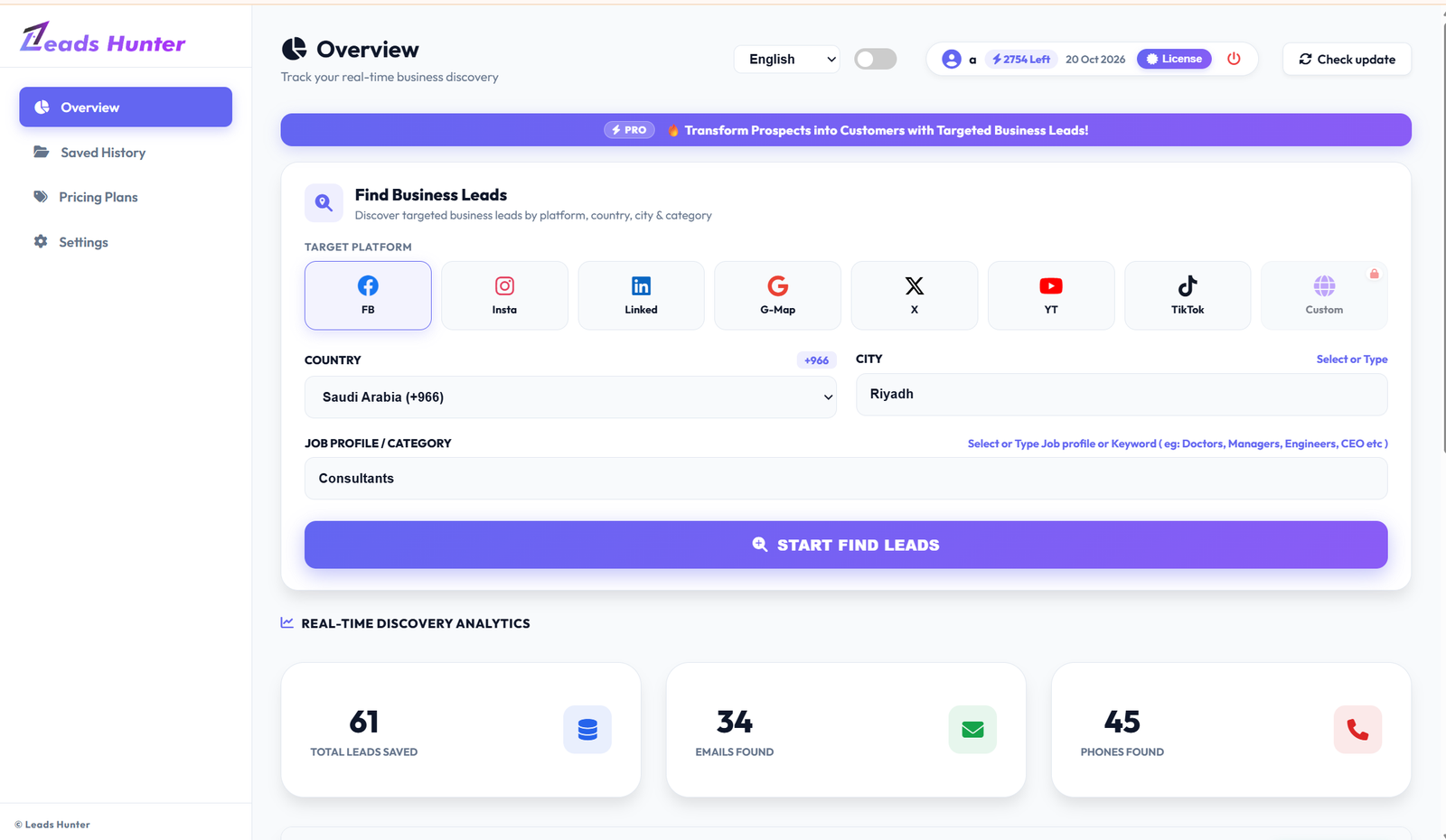
STEP 3 • SEARCH CRITERIA

Select Target Platform, Country, City & Job Category

Choose from 7 platforms (Facebook, Instagram, LinkedIn, Google Maps, X, YouTube, TikTok). Select target Country & City (e.g., Saudi Arabia, Riyadh), enter Job Profile or Category keywords (e.g., "Consultants", "Doctors", "Managers", "CEOs"), and click START FIND LEADS.

Leads Hunter • Discovery Dashboard & Filters
Leads Hunter Search Filters
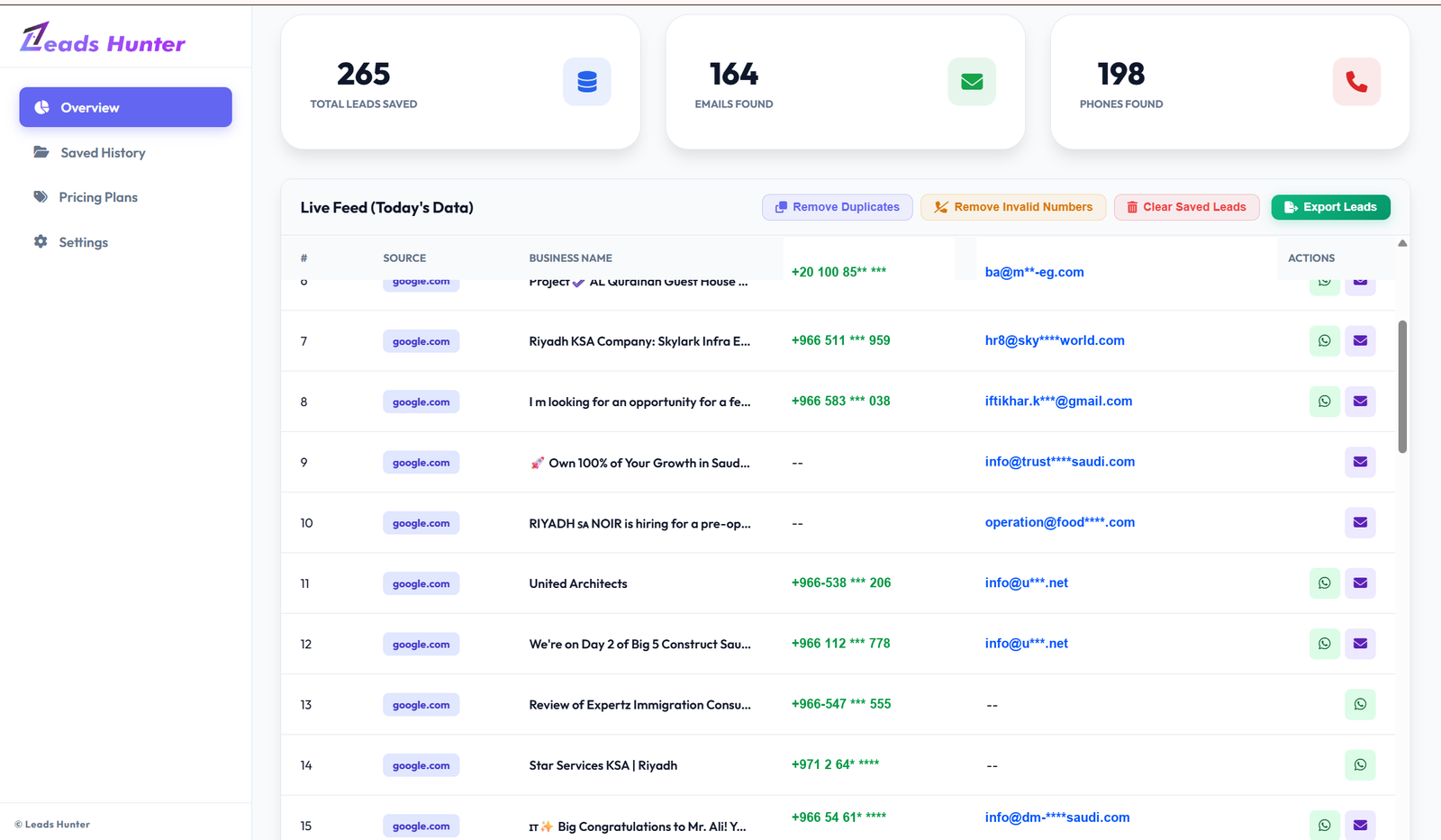
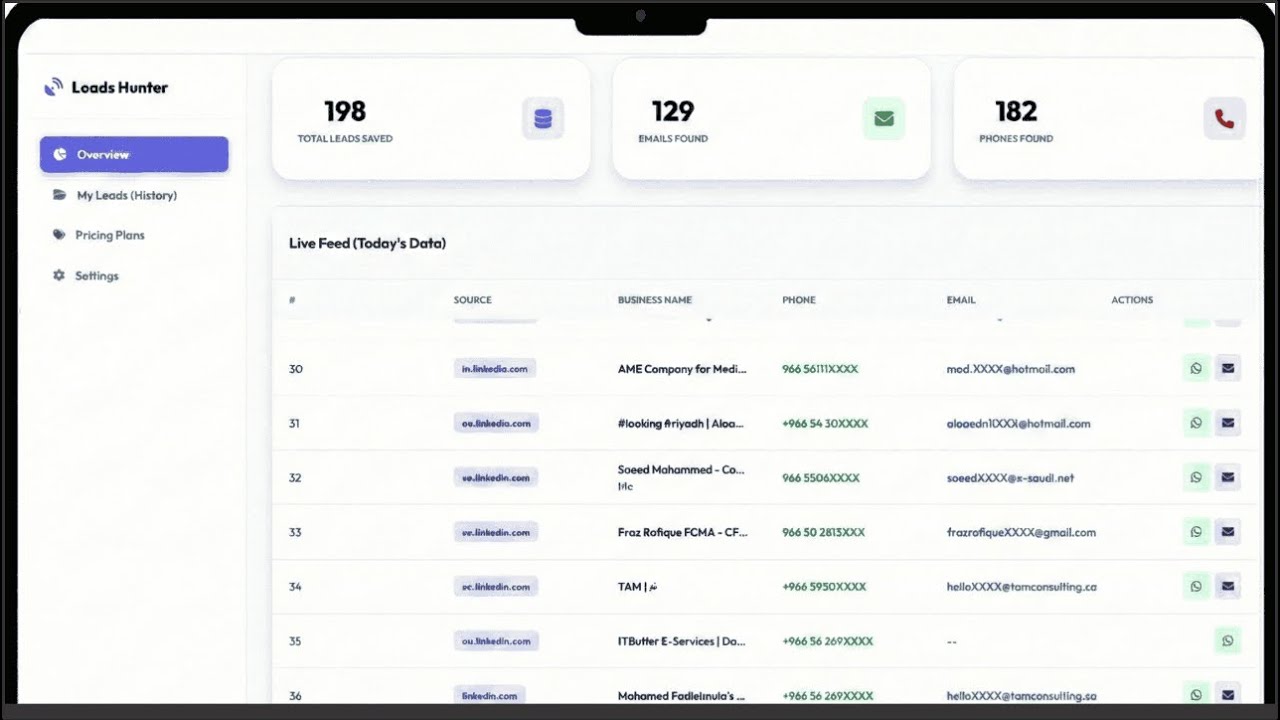
STEP 4 • REAL-TIME LEADS FEED

Real-Time Lead Extraction with Phone & Email

Watch Leads Hunter collect high-quality leads live in real-time. View Business Names, Phone Numbers, and Verified Emails. Use 1-click tools: "Remove Duplicates" and "Remove Invalid Numbers" for maximum lead accuracy.

Leads Hunter • Live Discovery Feed & Quality Tools
Leads Hunter Live Feed
STEP 5 • 1-CLICK EXPORT

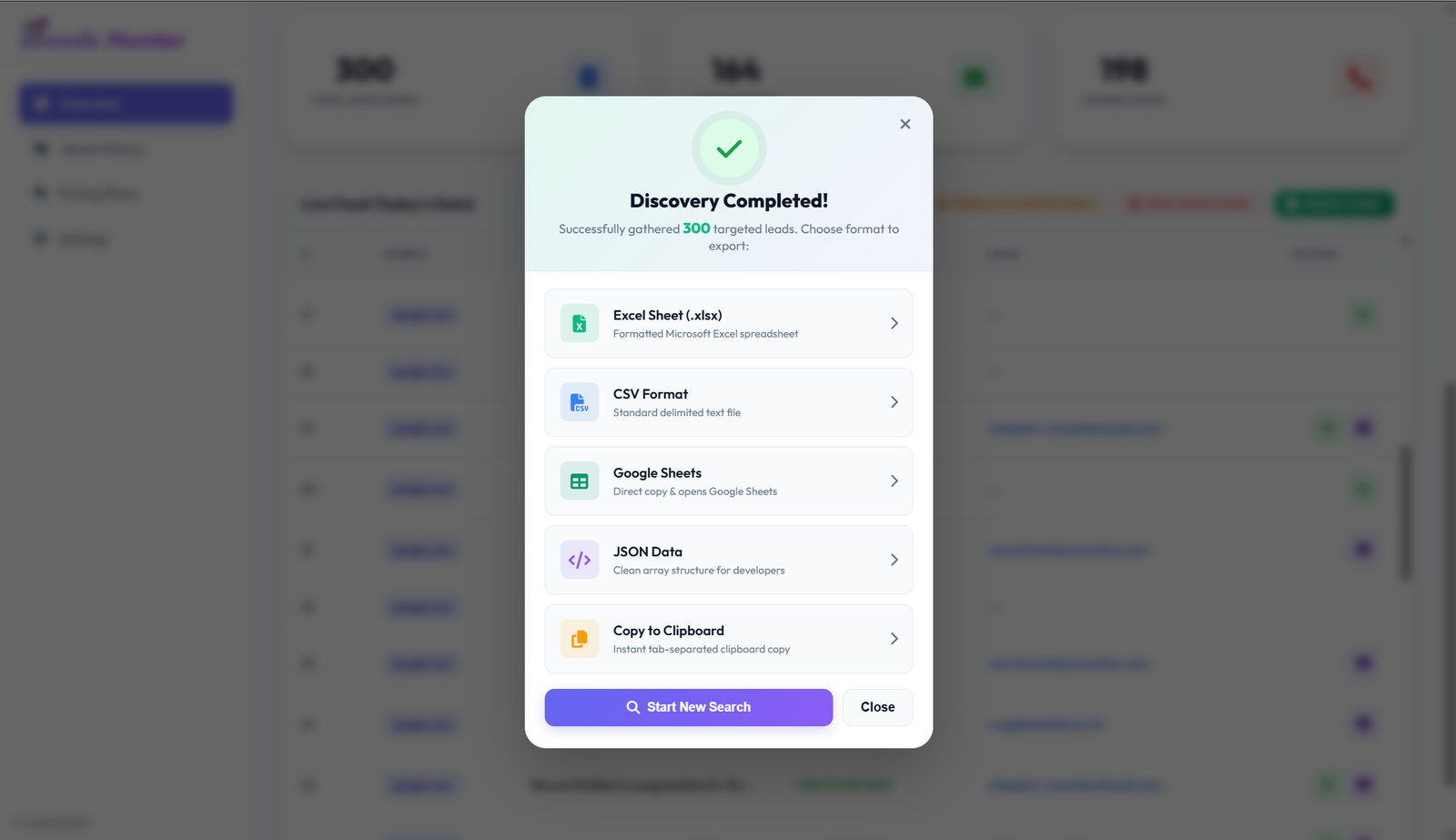
Easily Export to Excel, CSV, Google Sheets & Clipboard

Once lead discovery is completed, easily export your collected contacts with a single click. Compatible with Microsoft Excel (.xlsx), CSV Format, Google Sheets, JSON Data, or instant Clipboard copy!

Leads Hunter • Discovery Completed & Export Formats
Leads Hunter Export Formats
WHO IS IT FOR

Built For Your Success

The Social Media Lead Scraper is built for people who want to find leads and contact data from social platforms without manual searching.

Sales Teams

Reach out to potential leads on social platforms

Marketing Agencies

Find and analyze social media leads

Business Owners

Research social profiles and competitors

Freelancers

Collect contact data for client projects

Recruiters

Source talent across social platforms

PR Agencies

Build media and influencer contact lists

Pay Once, Use For 1 Year

Your personal data extraction assistant - trusted by thousands of professionals worldwide.

🚀 SPECIAL OFFER: SAVE 50%

Silver Package

$598 $299
$49.83 $24.92 / month
(Billed Annually)
1 YEAR ACCESS
BEST FOR Startups & Small Businesses
  • 3,000 Leads Yearly
  • Basic Features
  • Any 2 Social Media Platforms
  • Supports Chrome
  • Email Support
  • GDPR compliance
  • Compatible with Excel, Google Sheets
🎉 SPECIAL OFFER: SAVE 50%

Gold Package

$798 $399
$66.50 $33.25 / month
(Billed Annually)
1 YEAR ACCESS
BEST FOR Growing Brands & Agencies
  • 6,000 Leads Yearly
  • Standard Features
  • Any 4 Social Media Platforms
  • Supports Chrome
  • Email & Chat Support
  • GDPR compliance
  • Compatible with Excel, Google Sheets
✨ Leads Hunter Setup
🎁

New Account Bonus

Create a new account and get 1 Day Free Trial instantly.

⚠️ Important: Use Valid Email
A verification code will be sent to your email address. You must verify your email to activate the trial.
Quick Installation Steps
1
Download & Unzip
2
chrome://extensions
3
Enable Dev Mode
4
Load & Pin It 📌
View Visual Screenshot Guide
Need help or full access?
To continue using Pro Features after the trial, a license is required.
📞 WhatsApp: +966 50 809 6029
📧 info@leadshunter.net